
PRTG Manual: Ribbon Menu
The ribbon menu is the main application menu presented as a tabbed ribbon menu at the top of the application. The ribbon menu contains tabs for the Backstage View, common operations on the 'Home' tab, network tools on the 'Tools' tab, and application settings on the 'Settings' tab. To change menus select any of the tabs. To hide the menu press the collapse icon on the right of the ribbon. If the ribbon is collapsed it can be restored by pressing the expand icon on the right of the ribbon.

The backstage view menu is available as a drop down tab at the far left of the ribbon menu. When the backstage view item is selected the backstage view is presented as a popup panel in front of the application. To close the backstage view complete one of the operations available in the backstage view, or press on one of the other ribbon menu tabs or quick access toolbar items.
See Backstage View for more information about the
The home menu provides access to the following common application operations.
Add Device
Add Device opens the single device discovery tool for discovering a single device to include in the current network discovery results. See Discovering a single device for more information.
Discover Network
Discover Network opens the network discovery tool used to discover an entire network. See Discovering Networks for more information.
Scheduled Discoveries
Scheduled Discoveries opens the scheduled discovery dialog used to run network discoveries on a scheduled basis. See Scheduling Network Discovery for more information.
Export to PRTG
This option is available if PRTG Connector is enabled and provides a wizard to walk you through exporting devices and maps to PRTG network monitor. See PRTG Connector for more information.
Protocol/Credential Settings
Protocol/Credential Settings opens the credentials manager used to manage network credentials available for communicating with network devices. See Managing Device Credentials for more information.
Discovery Settings
Discovery Settings opens the discovery settings library used manage discovery settings available for network discoveries. See Discovery Settings for more information.
Manual Links
Manual Links opens the manual links library used to manage user created links presented in topology maps and network connectivity summaries. See Manual Links for more information.
Discovery Diff
Discovery Diff opens the network discovery comparison which compares two discovered networks for differences. See Comparing Discovered Networks for more information.
Discovery Audit
Discovery Audit opens the discovery audit tool which provides information on ways to improve network discoveries. See Network Discovery for more information.
The tools menu provides access to the network tools.
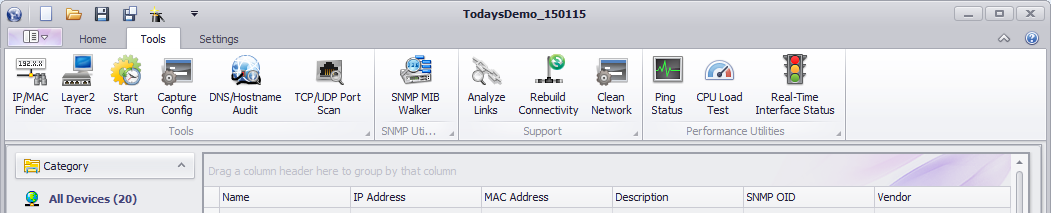
IP/MAC Finder
IP/MAC Finder opens the IP/MAC address finder tool used to locate references to an IP or MAC address on devices in the network discovery result. See IP/MAC Address Finder for more information.
Layer 2 Trace
Layer 2 Trace opens the Layer 2 Trace tool used to track the connection path between two devices and the paths current ping and interface UP/DOWN status. See Layer 2 Trace for more information.
Start vs. Run
Start vs. Run opens the network device startup vs. running configuration tool used to compare a devices startup and running configurations. See Startup vs. Running Configuration for more information.
Capture Config
Capture Config opens the network device configuration capture tool used to capture the startup and running configurations on a network device. See Configuration Capture for more information.
DNS/Hostname Audit
DNS/Hostname Audit opens the DNS/Hostname Audit tool used to ensure IP Addresses and Hostnames are resolving correctly on the network. See DNS/Hostname Resolver for more information.
TCP/UDP Port Scan
TCP/UDP Port Scan opens the port scan tool used to scan for open ports on a network devices. See Port Scanner for more information.
SNMP MIB Walker
SNMP MIB Walker opens the MIB walker tool used to query SNMP responses on common MIBS. See SNMP MIB Walker for more information.
Note: The MIB Walker tool is not a full featured MIB walker. It is intended to be used as a support tool when troubleshooting incorrect or unavailable SNMP responses from devices during network discovery.
Ping Status
Ping Status opens the ping response poller used to poll ping responses on network devices. See Ping Response Poller for more information.
CPU Load Test
CPU Load Test opens the CPU Load Poller used to poll the CPU load on several network devices. See CPU Load Poller for more information.
Real-Time Interface Status
Real-Time Interface Status opens the Interface Status Poller used to poll the status of the interfaces on a device. See Interface Status Poller for more information.
The settings menu is used to configure the following application settings.
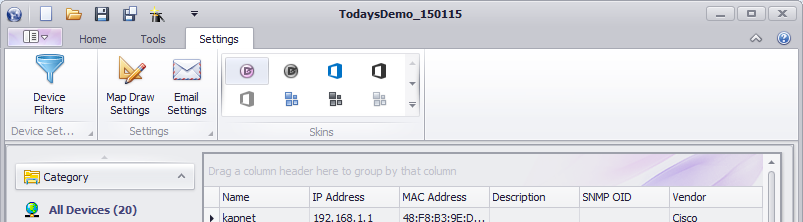
Device Filters
Device Filters opens the device filters library. Device filters are used throughout the application to create a set of devices based on device criteria. See Device Filters for more information.
Map Draw Settings
Map Draw Settings opens the map draw settings dialog used to configure application wide map draw settings. See Map Draw Settings for more information.
Email Settings
Email Settings opens the email settings dialog used to configure default email server and client email settings. UVexplorer uses the email server settings when sending email notifications. See SMTP Email Server Settings for more information.
PRTG Export Settings
This option is available if PRTG Connector is enabled and provides a way to manage PRTG export template settings. See PRTG Export Templates for more information.
Skins
UVexplorer can change the look and feel of the application by selecting different themes in the application skin picker. See Application Skins for more information.
