
PRTG Manual: Capturing Device Configurations
UVexplorer provides the ability to capture and compare device configurations.
Device configurations are captured by connecting to the device Command Line Terminal using the SSH or Telnet protocols. Once connected a script is run against the device which captures the appropriate configurations to be stored in the UVexplorer database.
Configuration captures can be started during discovery, using the configuration Start vs. Run report tool, or for a single device using the Capture Configuration tool.
Capturing Configurations during Discovery
To capture device configurations during discovery enable the 'Capture Device Configurations' setting located in the 'Advanced' tab of the discovery settings dialog. Appropriate SNMP and Telnet or SSH credentials must be provided in-order to determine the correct configuration capture script to run, and in-order to connect to the device command line terminal.
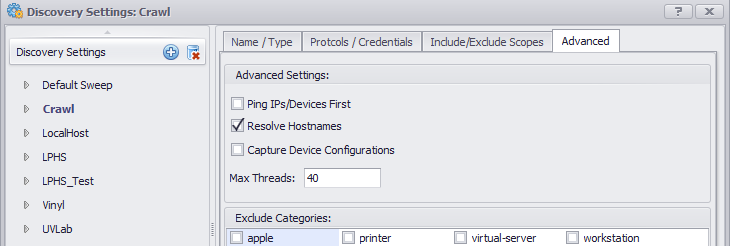
If the 'Capture Device Configurations' setting is enabled and the correct credentials are provided the Startup and Running configurations will be captured where available. The results of the configuration captures will be stored on the corresponding device properties within the discovery results.
See Discovery Settings for more information.
Capturing Configurations using the Start vs. Run tool
The Start vs Run configuration tool provides the ability to capture the startup and running configurations for the selected devices. Once the configurations are captured they will be compared for differences and the results will be reported.
See Start vs Run for more information.
Capturing Configurations using Capture Configuration tool.
Device configurations can be captured for a single device using the Capture Configuration tool.
See Configuration Capture for more information about capturing configurations for a single device.
