
PRTG Manual: Reports
UVexplorer reports combine specific information from devices in the network into an easy to view and export report.
Reports are limited in Trial and Free license modes. In free mode reports can not be viewed. In trial mode reports will be limited to displaying and exporting only 25 entries.
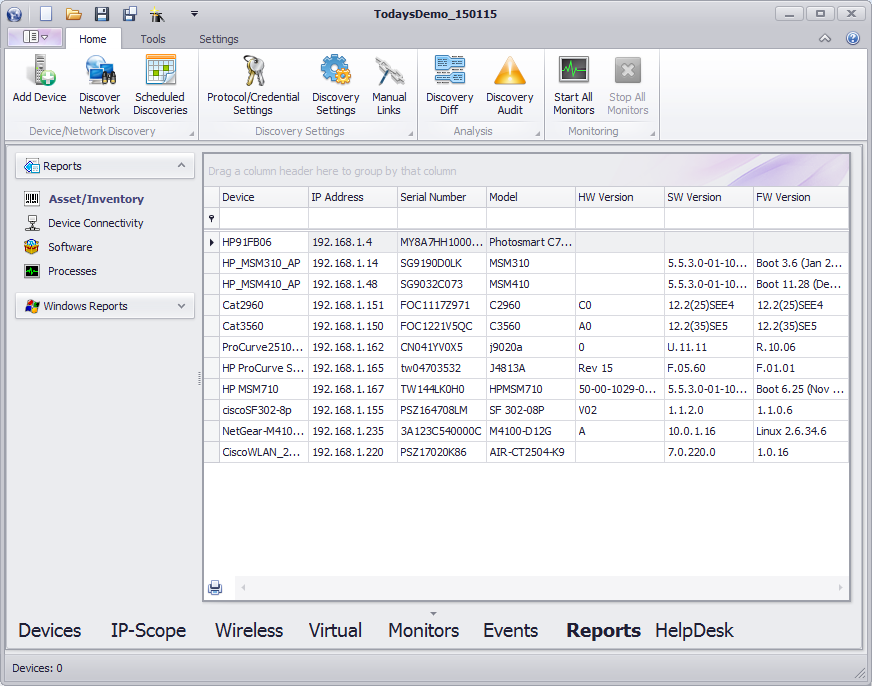
Each report contains entries in grid that can be grouped, sorted, filtered and exported.
To group the report by a column, drag the column into the group header at the top of the report. The report entries will be grouped into sections based on the values of the grouped on column. To group on multiple columns drag each columns to the header in the order you would like them grouped.
To sort report entries click on the column headers. To sort multiple columns sort each column in the order you want them sorted.
To filter the values of a column select the filter icon in the right corner of the column header. A list of values to filter by will be presented. When a value is selected only entries containing that value will remain in the displayed results.
To export a report group, sort, and filter it as desired then press the print button in the lower left corner of the report. A print/export dialog will be opened with the current contents of the report grid. The print dialog provides a lot of features to format and customize the report. To print the report select the 'Print' button in the upper ribbon or the file menu. To save it to a file select the 'Export' button in the upper ribbon or the file menu. The print dialog supports exporting to several file formats including image, csv, html, and xsl.
UVexplorer reports are categorized into data collected from windows machines using windows protocols and data collected from other devices typically using SNMP standard MIBs. To capture information presented in the reports valid SNMP and Windows credentials must be provided during discovery.
The reports in the reports section contain device data typically collected from network devices using SNMP standard MIBs. The available reports include:
Asset/Inventory
The asset and inventory report contains device system information such as the Serial Number, Model, Software Version, and Hardware Version.
Device Connectivity
The device connectivity report contains the network device connectivity links including the devices in the link and the interfaces they are connected on.
Software
The software report contains entries for installed software on devices in the discovery result..
Processes
The processes report contains entries for the running processes on devices in the discovery result.
The reports in the windows reports section contain device data collected from windows machines using data read from standard windows tables
Computer Systems
The computer systems report contains the device computer system information including the model, manufacturer and warranty.
BIOS
The BIOS report contains the BIOS information of the device including the version, serial number, and install date.
Operating Systems
The operating systems report contains the operating system information of the device including the version, serial number, and install date.
Processors
The processors report contains the processor information of the device including the name and description of each processor on the device.
Disk Drives
The disk drives report contains the hard disk drive information of the device including the name, serial number, model, and size.
Logical Disks
The logical disk drives report contains the logical disk drive information of the device including the name, size and free space.
