
PRTG Manual: Queries
In the Queries section, you can view and manage all the queries added to the database.
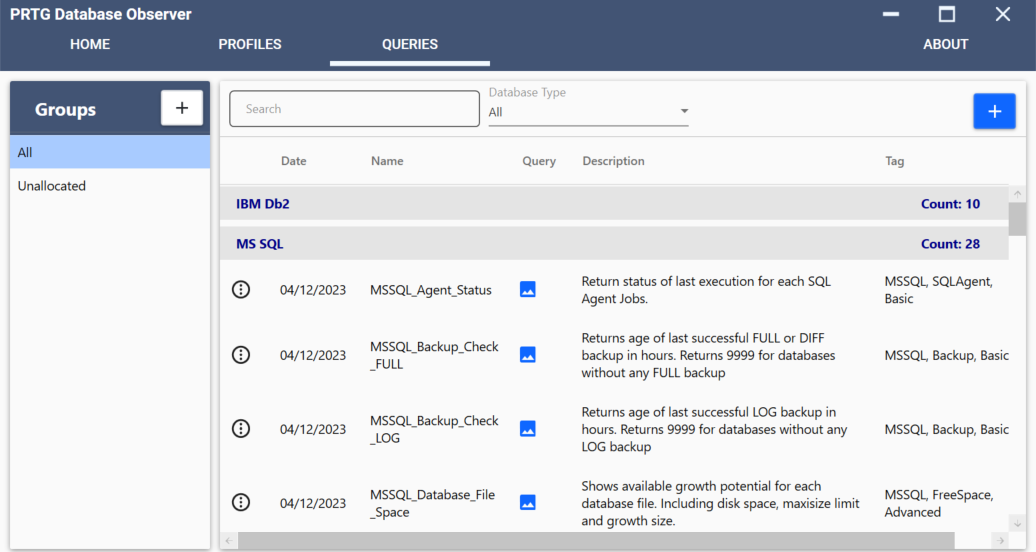
Queries tab
On this page:
The query result is expected to have from 2 to 5 columns in a specific format.
 For more information on the elements available in PRTG, see the PRTG Manual: Custom Sensors.
Column |
Mandatory |
Name |
Type |
Description |
|---|---|---|---|---|
1 |
Yes |
Channel |
▪VARCHAR ▪NOT NULL |
The name of the channel as displayed on the PRTG web interface. |
2 |
Yes |
Value |
▪INT ▪FLOAT |
The numeric value of the channel in PRTG as integer or float. |
3 |
No |
Channel_Settings |
▪VARCHAR ▪XML format |
The sensor will be set to the Down state regardless of the channel limits. |
4 |
No |
Error |
BIT |
The numeric representation of when a sensor is in the Down state. The default value is 0. ▪0: There is no error. ▪1: There is an error and the sensor is set to the Down state. The error message is displayed in the Message field. |
5 |
No |
Text |
VARCHAR |
The text that the sensor displays in the Message field with every scanning interval.
|

SELECT
DB_NAME(database_id) AS Channel,
sum(size * 8/1024) AS Value,
'<Unit>Custom</Unit>
<CustomUnit>MB</CustomUnit>' AS Channel_Settings
FROM sys.master_files
GROUP BY database_id
Channel |
Value |
Channel_settings |
|---|---|---|
master |
4 |
<Unit>Custom</Unit> <CustomUnit>MB</CustomUnit> |
tempdb |
2 |
<Unit>Custom</Unit> <CustomUnit>MB</CustomUnit> |
model |
3 |
<Unit>Custom</Unit> <CustomUnit>MB</CustomUnit> |
msdb |
35 |
<Unit>Custom</Unit> <CustomUnit>MB</CustomUnit> |
PRTG_Database_Observer |
4 |
<Unit>Custom</Unit> <CustomUnit>MB</CustomUnit> |
<prtg>
<result>
<channel>master</channel>
<value>4.00</value>
<Unit>Custom</Unit>
<CustomUnit>MB</CustomUnit>
</result>
<result>
<channel>tempdb</channel>
<value>2.00</value>
<Unit>Custom</Unit>
<CustomUnit>MB</CustomUnit>
</result>
<result>
<channel>model</channel>
<value>3.00</value>
<Unit>Custom</Unit>
<CustomUnit>MB</CustomUnit>
</result>
<result>
<channel>msdb</channel>
<value>35.00</value>
<Unit>Custom</Unit>
<CustomUnit>MB</CustomUnit>
</result>
<result>
<channel>PRTG_Database_Observer</channel>
<value>4.00</value>
<Unit>Custom</Unit>
<CustomUnit>MB</CustomUnit>
</result>
<result>
<channel>zPlugin Execution Time</channel>
<value>2.51717523</value>
<unit>TimeSeconds</unit>
<float>1</float>
</result>
</prtg>
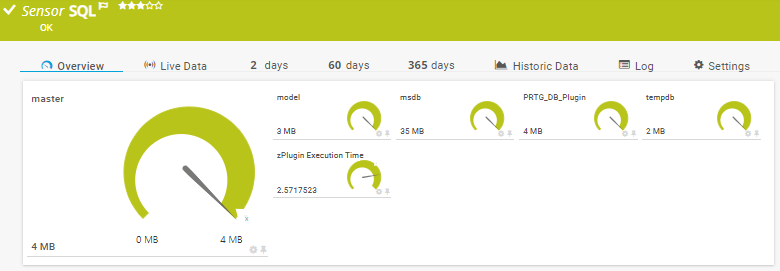
PRTG sensors
