
PRTG Manual: License and PRTG configuration
The first time you open PRTG Database Observer, it is running the 30-day Free Trial License.
If you have purchased a license, you can enter your License Key in the About section or using a command line as described in section Validate a full license. This is also where you can find the Machine ID required to generate a new License Key.
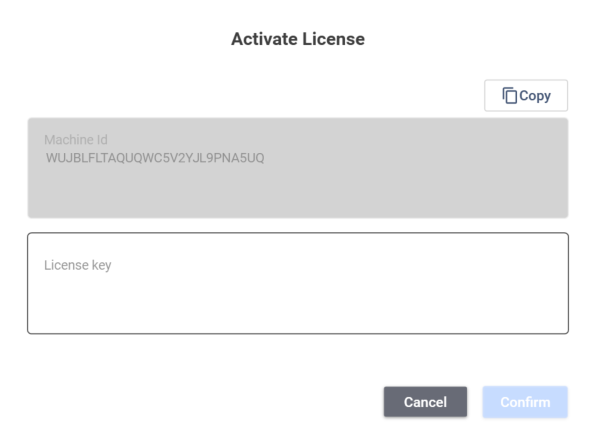
PRTG Database Observer license activation
After the first start-up, you will also need to add your PRTG servers, depending on your license type. This is done by clicking on Add in the PRTG Servers section on the About tab. You must provide the following:
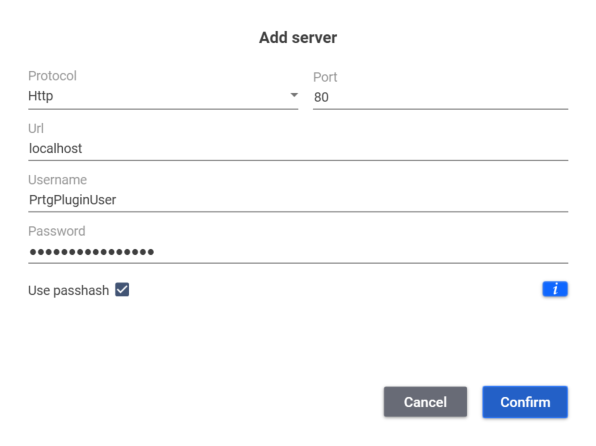
Add a PRTG server
Setting |
Description |
|---|---|
Protocol |
The protocol used by the PRTG core server: ▪HTTP ▪HTTPS |
Port |
The port of the PRTG core server.
|
URL |
The URL of the PRTG core server. |
Username |
The user name of the PRTG core server. |
Password |
The password of the PRTG core server. |
Use Passhash |
Check this box if you want to use a passhash instead of a password. Enter the passhash in the Password field.
|

