
PRTG Manual: Comment section
The query configuration can be auto-filled from within the query using specific tags in the comment block of a SQL script instead of manually entering all the options in the Add Query dialog.
1.Open the Add Query dialog.
2.In the Show Query field, click  and insert the SQL, which has a comment block specified as a first text in the script. See the example below.
The following tags are available:
Tag |
Description |
|---|---|
@NAME |
Enter the name of the query. |
@DESCRIPTION |
Enter a description for the query. All text after the colon (:) and before the next tag or the end of the comment is inserted into the Query description property. |
@TYPE |
Specify the type of SQL: ▪MSSQL ▪ORACLE ▪MySQL ▪SAPHANA ▪IBMDB2 ▪MAXDB ▪IBMINFORMIX ▪SAPASE ▪PostgreSQL |
@TAGS |
Define any tags for the query.
|
@VERSION |
Specify the version of the query. |
@INTERVAL |
Enter a recommended scanning interval. |
 Separate multiple tags with a comma (,).
/*
@NAME: ExampleQueryForAutomaticFillDemo
@DESCRIPTION: Monitors static value in MSSQL database and trigger error sensor status using value limit mode.
@param1 = Example parameter to provide channel name
@TYPE: MSSQL
@VERSION: 1.0
@TAGS: MSSQL, Generic, Advanced
@INTERVAL: 1 hour
EXAMPLE OUTPUT:
------------------------------------------------------------------------------------------------------
| Channel | Value | Channel_Settings |
------------------------------------------------------------------------------------------------------
| Default Channel Name | 25 |<Unit>Custom</Unit><CustomUnit>static</CustomUnit><LimitMode>1</LimitMode><LimitMaxError>5</LimitMaxError> |
*/
/* In MSSQL it is easy to use variables with default value handling */
DECLARE @channel VARCHAR(50) = '@param1';
/* Set default value of variable if no parameter was provided */
if replace('@ param 1',' ','') = @channel
SET @channel = 'Default Channel Name';
SELECT @channel, 25,
'<Unit>Custom</Unit>
<CustomUnit>static</CustomUnit>
<LimitMode>1</LimitMode>
<LimitMaxError>5</LimitMaxError>
' AS Channel_Settings
The example query above will result in the creation of a query with following parameters:
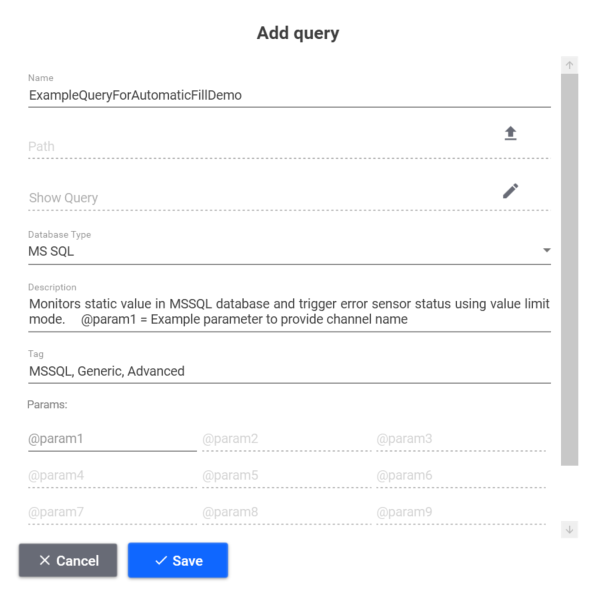
Auto-filled Add Query dialog
The final query in PRTG when used with script parameters:
-profile:mssql01cust02 -query:ExampleQueryForAutomaticFillDemo "-params:@param1:Name from parameter"
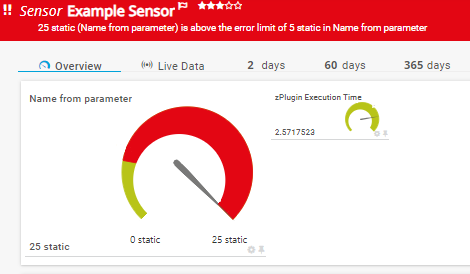
PRTG Database Observer sensor with limits and parameters
