
PRTG Manual: System requirements
There are different aspects that you need to consider regarding the system requirements for the multi-platform probe. Meet these requirements to avoid issues while you monitor your network.
In this section:
▪Multi-platform probe requirements
To install a PRTG core server, you need to meet several system requirements.
 For up-to-date setup recommendations, see the Paessler website: System requirements for PRTG.
Multi-platform probe requirements
You can use the multi-platform probe on various non-Windows operating systems. All requirements listed apply to the most recent version of the multi-platform probe. Use any unlisted operating systems or versions at your own risk.
For more information about the most recent multi-platform probe release, see the Knowledge Base: https://helpdesk.paessler.com/en/support/solutions/articles/76000064809
Component |
Minimum version |
PRTG core server |
The multi-platform probe is always backwards compatible with at least three PRTG stable releases. For more information on which multi-platform probe versions are compatible with which PRTG versions, see the Knowledge Base: https://helpdesk.paessler.com/en/support/solutions/articles/76000084909
|

Operating system |
Version |
Architecture |
Note |
Ubuntu Linux |
Ubuntu 20.04 Ubuntu 22.04 Ubuntu 24.04 |
ARMv7 (32-bit) ARMv8 (32-bit, 64-bit) x86-64 |
Requires glibc as of version 2.31 |
Debian Linux |
Debian 11 Debian 12 Debian 13 |
ARMv7 (32-bit) ARMv8 (32-bit, 64-bit) x86-64 |
Requires glibc as of version 2.31 |
RHEL |
RHEL 9 RHEL 10 |
x86-64 |
Requires glibc as of version 2.31 |
Raspberry PI OS |
Debian 11 Debian 12 Debian 13 |
ARMv7 (32bit) ARMv8 (32-bit, 64-bit) |
Supported models: ▪RPi 2 Model B, B v1.2 ▪RPi 3 Model B, B+ ▪RPi 4 Model B |
Hardware requirements for the multi-platform probe mainly depend on the operating system, sensors, and scanning intervals that you use. Your network size can also influence performance of your monitoring.
Sensors per multi-platform probe |
CPU cores |
RAM |
Disk space |
|---|---|---|---|
Up to 400 |
2 |
1 GB |
8 GB |
400 - 4,000 |
4 |
1 GB |
8 GB |
4,000 - 10,000 |
6 |
2 GB |
8 GB |
> 10,000 |
We recommend that you set up additional multi-platform probes. For more information on scaling, you can also contact the Paessler Presales team. |
||

You can find concrete examples of hardware setups that work with the multi-platform probe below.
Platform |
CPU power |
Memory * |
Scenario 1 ** Sensor count |
Scenario 2 *** Sensor count |
armv7 aarch64 |
Cortex-A53 4 cores at 1.2 GHz |
>0.5 GB |
600 |
3,000 |
armv7 aarch64 |
Cortex-A72 4 cores at 1.5 GHz |
>0.5 GB |
1,200 |
6,000 |
amd64 |
Server grade CPU 2 cores at 2 GHz |
>1 GB |
1,250 |
6,250 |
amd64 |
Server grade CPU 4 cores at 2 GHz |
>1 GB |
2,000 |
10,000 |
* The memory required for your setup is dependent on the types of sensors you use. Sensors with a high or very high performance impact require more memory.
** The possible number of sensors if all sensors have a one-minute scanning interval.
*** The possible number of sensors if all sensors have a five-minute scanning interval.
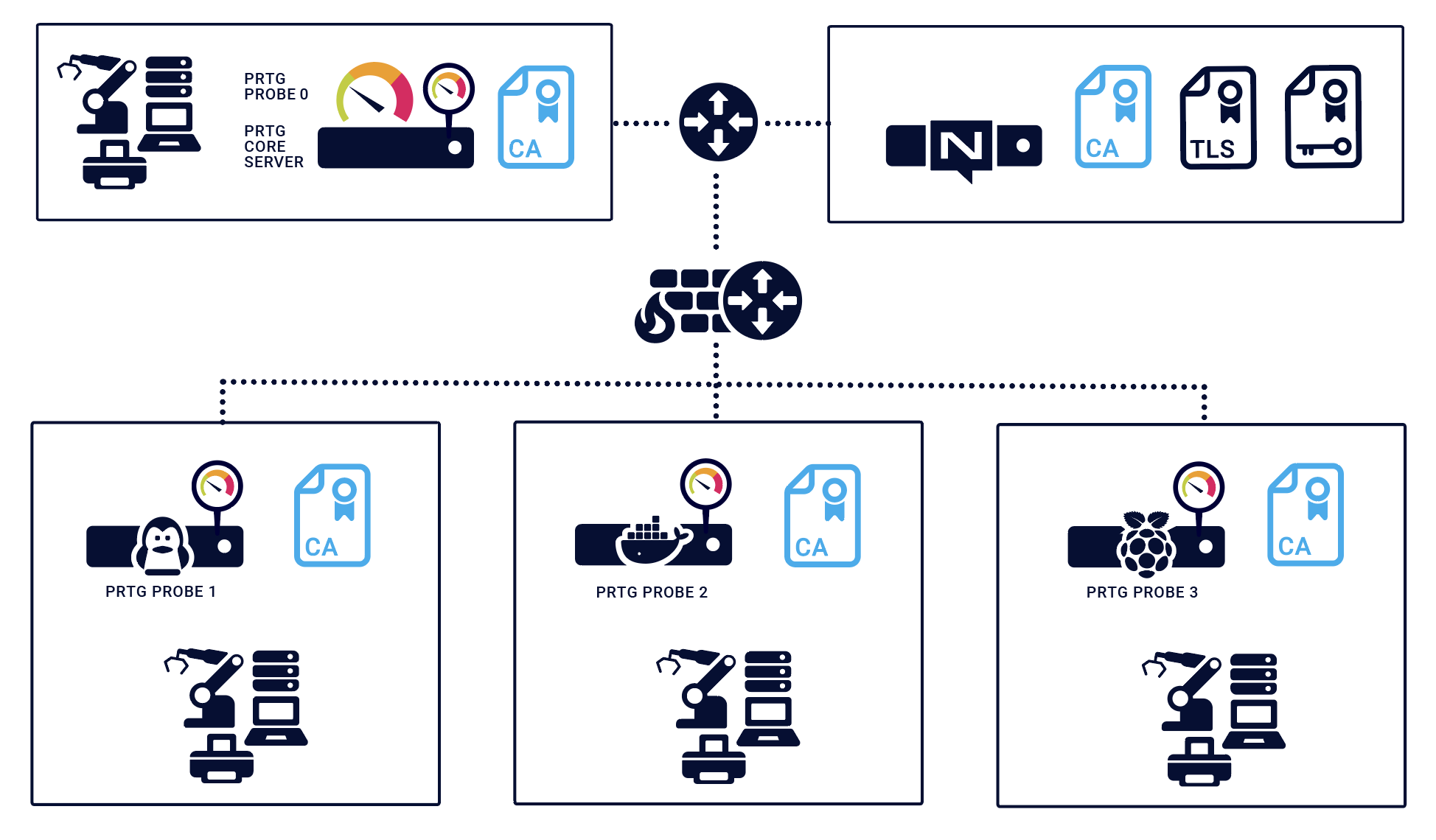
Required certificates
The NATS server requires a Transport Layer Security (TLS) server certificate and a TLS server certificate key that was issued by a certificate authority (CA) root certificate.
You must have the same CA root certificate on the PRTG core system, the NATS server system (if different than the PRTG core system), and on the multi-platform probe.
 With the integrated NATS server, PRTG can create and save a TLS server certificate and CA root certificate for you. For more information, see section Configure NATS server connection.
